Explicación de los ensayos de ballbar
La popularidad de los ensayos de ballbar para medir la precisión de la Máquina-Herramienta se ha extendido por su sencillez, facilidad de preparación, rapidez de uso, y la gran cantidad de datos de utilidad de los informes generados.
¿Cómo funciona el ensayo de ballbar?
En teoría, si se programa una máquina CNC para trazar una trayectoria circular y el posicionamiento es perfecto, el círculo resultados coincidirá exactamente con el círculo programado. En la práctica, diversos factores pueden hacer que el radio del círculo del ensayo y su forma se desvíen del círculo programado. Estos factores incluyen la geometría de la máquina, la complejidad del sistema de control, y el uso y desgaste de la máquina con el paso del tiempo.
Comparando la trayectoria circular programada en la máquina con la trayectoria real medida, puede determinar la precisión de la máquina. Esta es la base de los ensayos de ballbar telescópico y del trabajo del ballbar QC20.
Tres sencillos pasos del ensayo de ballbar QC20
Reglaje
La conexión con el ballbar QC20 es muy sencilla gracias a la conectividad Bluetooth. El reglaje del ensayo es rápido y sencillo mediante el software Ballbar 20, que guía al operario paso a paso. El "generador de programas automáticos" le ayuda a configurar los programas correspondientes en la Máquina-Herramienta.
Las completas funciones de gestión de archivos incluyen funciones de búsqueda para un acceso fácil y rápido a las plantillas existentes.
El pivote central se coloca en la mesa de la máquina mediante la bola de ajuste incluida en el ballbar QC20. El husillo se desplaza al punto de referencia y se definen las coordenadas "cero" del ensayo.
El husillo se desplaza a la posición de inicio del ensayo y se monta el ballbar QC20 entre las copas cinemáticas magnéticas. Todo lo que necesita para ejecutar la comprobación es un sencillo programa de comandos G02 G03.
Captura de datos
La prueba "clásica" llama a la Máquina-Herramienta para que realice dos círculos consecutivos: uno en la dirección de las agujas del reloj y otro en el sentido contrario. En la práctica, se añade un arco adicional antes y después de cada círculo del ensayo para permitir la aceleración y deceleración de la máquina.
Mediante las barras de extensión, es posible seleccionar el radio del ensayo acorde al tamaño de la máquina y su sensibilidad a determinados problemas (p.ej., los círculos de radio grandes son mejores para resaltar los errores de geometría de la máquina, los círculos más pequeños son más sensibles a desajustes del servo y retrasos).
La captura de datos en tiempo real permite detectar errores o problemas durante el ensayo. Es posible detener el ensayo para no perder un tiempo importante durante la realización de un ensayo de radio grande a velocidad de avance lenta.
Antes de iniciar el sistema QC20, se efectúan pruebas en el plano perpendicular según el plano de prueba X-Y estándar utilizando montajes de prueba y recolocando el montaje central. A continuación, puede realizar ensayos que incluyan tres planos ortogonales sin mover el pivote central.
El secreto consiste en la capacidad del sistema QC20 para realizar un arco restringido (220°) en dos de los planos. Este método genera un análisis de ensayo modificado del arco, no obstante, también genera un valor de circularidad total del ensayo.
Al realizar los tres ensayos sobre un único punto, dispone de un informe de diagnóstico volumétrico en el software Ballbar 20, que proporciona más información y más rápidamente que en los sistemas anteriores.
Análisis de datos y el diagnóstico
Puede elegir entre distintos formatos de informes conformes con los estándares internacionales (p.ej., ISO, ASME) y la extensa gama de diagnósticos de Renishaw (incluido el análisis volumétrico) con una serie de distintas vistas de pantalla y enlaces al manual de ayuda.
Estos informes proporcionan un valor para un indicador general sencillo del rendimiento de posición de la máquina, por ejemplo, desviación circular.
Es posible personalizar y enviar varios informes con un diagnóstico completo de los errores de máquina, con un solo ensayo.
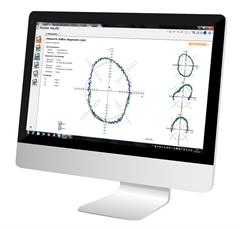
El ballbar QC20 para verificación de Máquina-Herramienta es muy valorado en el sector y es el más utilizado para diagnósticos de Máquina-Herramienta.
Más informaciónDescargar Ballbar 20
El software ha sido mejorado para proporcionar aún más flexibilidad en los ensayos y la generación de informes.
¿Puedo utilizar el ballbar QC20 para cumplir la norma ISO 10791-6?
Sí, con el ballbar QC20 es posible completar la mayoría de los ensayos para cumplir la norma ISO 10791-6.
Durante los movimientos multi-eje, una máquina intenta mantener una separación fija entre la punta de la herramienta y la pieza de trabajo. Un ballbar puede inspeccionar el rendimiento de contorneado midiendo cualquier desviación entre la punta de la herramienta y la pieza de trabajo mientras realiza el seguimiento de las trayectorias multi-eje.
La norma ISO 10791-6 exige informar la desviación máxima y mínima que se puede obtener solo con la captura de datos en el software Ballbar Trace.
Recursos adicionales
-
 Folleto: Ballbar inalámbrico QC20-W de Renishaw para diagnóstico de rendimiento de Máquinas-Herramienta
-
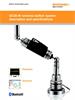
 Brochure: QC20-W wireless ballbar system description and specifications [en]
-
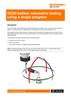
 Application note: QC20 volumetric testing using a single program [en]
-
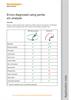
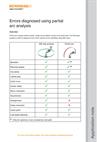 Application note: Errors diagnosed using partial arc analysis [en]
-
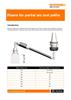
 Application note: Risers for partial arc tool paths [en]
-
 Data sheet: Traceability chart: Ballbar - UK, USA, Japan and Germany [en]
Consulte a nuestro equipo comercial hoy mismo
Para obtener más información o para configurar un paquete de servicio a la medida exacta de sus necesidades, póngase en contacto con uno de nuestros expertos.